oMLX Ornith-1.0-35B-8bit 給 Codex 使用的設定紀錄
在 MacBook Pro(M4 Max、128 GB unified memory)上, mlx-community/Ornith-1.0-35B-8bit 適合用 oMLX 以 Responses API 提供給 Codex。建議保留模型的 262144 context window、開啟 thinking 的二元開關、使用 qwen3 reasoning parser,但不要在 Codex catalog 宣告 low/medium/high 這類 reasoning effort level。
適用環境
本文以以下環境作為設定紀錄:
項目 | 設定 |
|---|---|
硬體 | MacBook Pro,M4 Max,128 GB unified memory |
Serving | oMLX,本機 OpenAI-compatible server |
模型 |
|
用途 | Codex / CC Switch / coding agent |
API | 優先用 |
這篇是公開筆記,範例中的路徑、API key 與使用者名稱都以 placeholder 呈現。
模型與架構的關係
Ornith-1.0-35B 是 Deep Reinforce 的 Ornith 模型家族成員,定位是 agentic coding / coding agent 模型。 Qwen3_5MoeForConditionalGeneration 不是另一個模型名稱,而是這個 MoE 版本在 Transformers / 本地 config 內使用的架構類別。
比較精準的說法是:
本機模型 config 顯示:
所以筆記或 model catalog 裡可以寫 Ornith,但排錯時看到 Qwen3_5MoeForConditionalGeneration 不代表載錯模型。
模型本身的能力與 context
本機 tokenizer 設定顯示 model_max_length = 262144 ,因此 oMLX 和 Codex catalog 都建議保留 262144 作為最大 context window。
MLX 8-bit 版本的 Hugging Face model card 也標示這是給 Apple Silicon 使用的 8-bit MLX quantization,並保留 multimodal vision encoder。實務上可以把 catalog 的 input_modalities 設為 ["text", "image"] ,但是否能穩定接圖片還是要以實際 serving runtime 測試為準。
建議 context 設定:
設定 | 建議值 | 說明 |
|---|---|---|
|
| 對齊 tokenizer 的 |
|
| Codex catalog 顯示用 |
|
| 先於硬截斷觸發壓縮 |
|
| 留下約 22K token 緩衝 |
|
| 單次輸出上限,可依任務縮小 |
對 coding agent 來說,不建議把 truncation limit 設到非常貼近 262144。工具輸出、錯誤 log、diff、長檔案內容都會讓 token 快速上升,保留緩衝區比較穩。
oMLX profile 建議設定
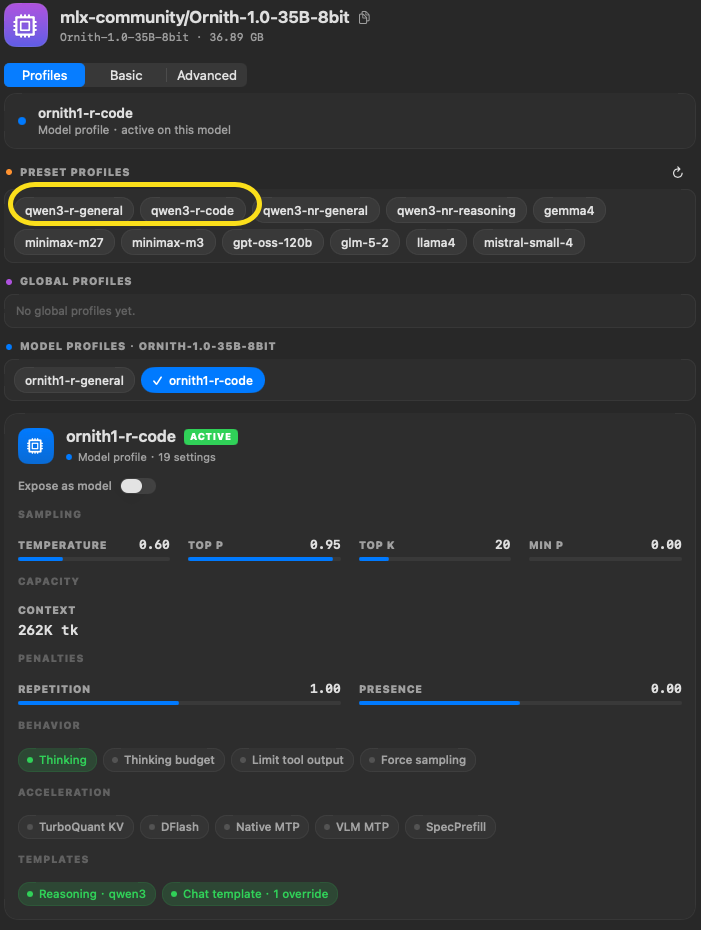
溫度等參數我是參考 preset profiles 內的 qwen3-r-general / qwen3-r-coding
目前比較穩的 coding profile 如下:
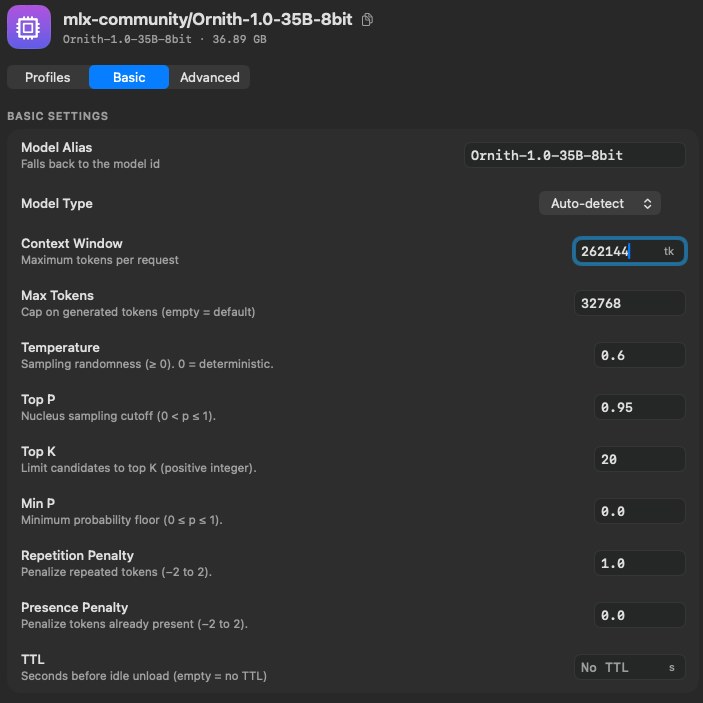
然後進階設定裡面
把 Enable Thinking 打開,
把 Reasoning Parser 選
qwen3。這樣就能讓模型在回答前先做 reasoning,但不會把<think>混進最終回答。Chat Template KWARGS 裡面新增 ENABLE_THINKING = true,這樣 oMLX 會把這個參數傳給模型的 chat template。
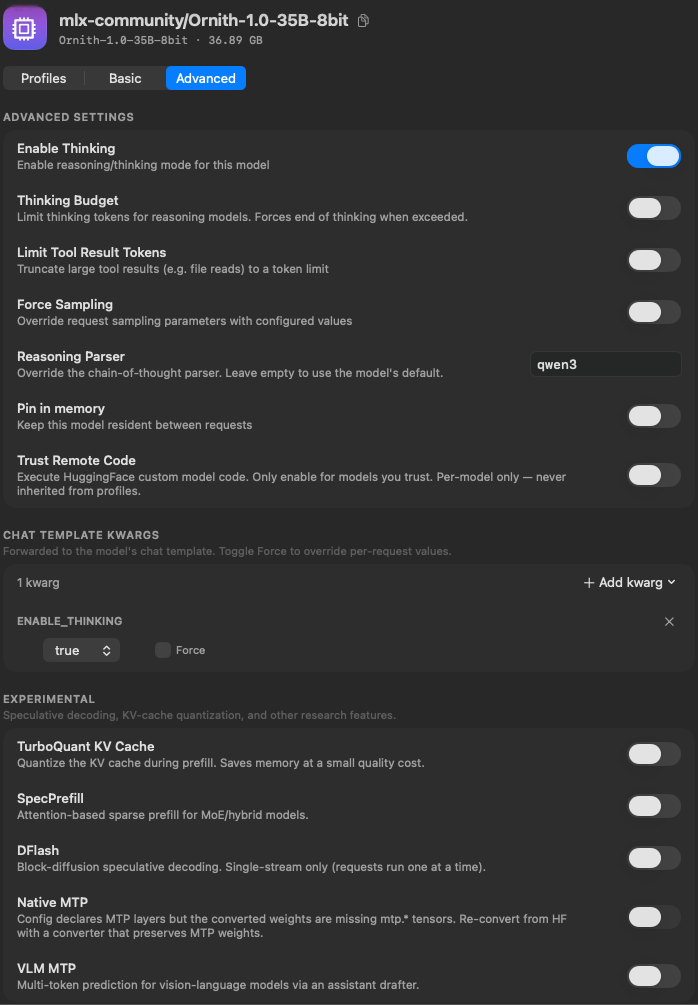
重點不是把所有參數都調滿,而是把 reasoning 的責任分清楚:
設定 | 作用 | 建議 |
|---|---|---|
| oMLX 模型層的 thinking 開關 | 開啟 |
| 傳進模型 chat template 的 thinking 參數 | 開啟 |
| 把模型輸出的 thinking 從最終回答拆出來 | 設 |
| 是否強制 thinking token budget | 先關閉 |
| 是否覆蓋 client 送來的 sampling | 先關閉 |
thinking_budget_tokens = 8192 可以保留作為未來開 budget 時的值,但在 thinking_budget_enabled = false 時不會主動限制 thinking。這符合「Ornith 可開 thinking,但不要宣告支援 OpenAI-style effort level」的設定方向。
Responses 與 Chat Completions 怎麼選
雖然設定裡有 chat_template_kwargs ,但這不代表 CC Switch 或 Codex 一定要走 Chat Completions。這裡有兩層概念:
因此 /v1/responses 仍然可以在 server 內部套用 chat template。實測結果也顯示 Responses 模式可以正常分離 reasoning。
實測 /v1/responses:
Chat Completions 對照測試也正常:
所以目前建議:
項目 | 建議 |
|---|---|
CC Switch 上游格式 |
|
oMLX endpoint |
|
Codex provider |
|
何時切 Chat | 只有在 Responses 下 tool call、streaming 或 reasoning 分離出問題時 |
Codex model catalog 建議
Codex catalog 應該把 Ornith 視為「模型會 reasoning,但不支援 Codex 可控 reasoning effort ladder」。
建議片段:
這裡最容易誤設的是:
不要加
low/medium/high/xhigh。不要把
supports_reasoning_summaries設成true,除非 client 真的需要且你確認相容。不要把
supports_search_tool設成true,除非本地 proxy 會處理 OpenAI 原生 web search tool。
模型會產生 reasoning,和 API client 能不能用 reasoning.effort 控制模型,是兩件不同的事。
CC Switch Provider 設定
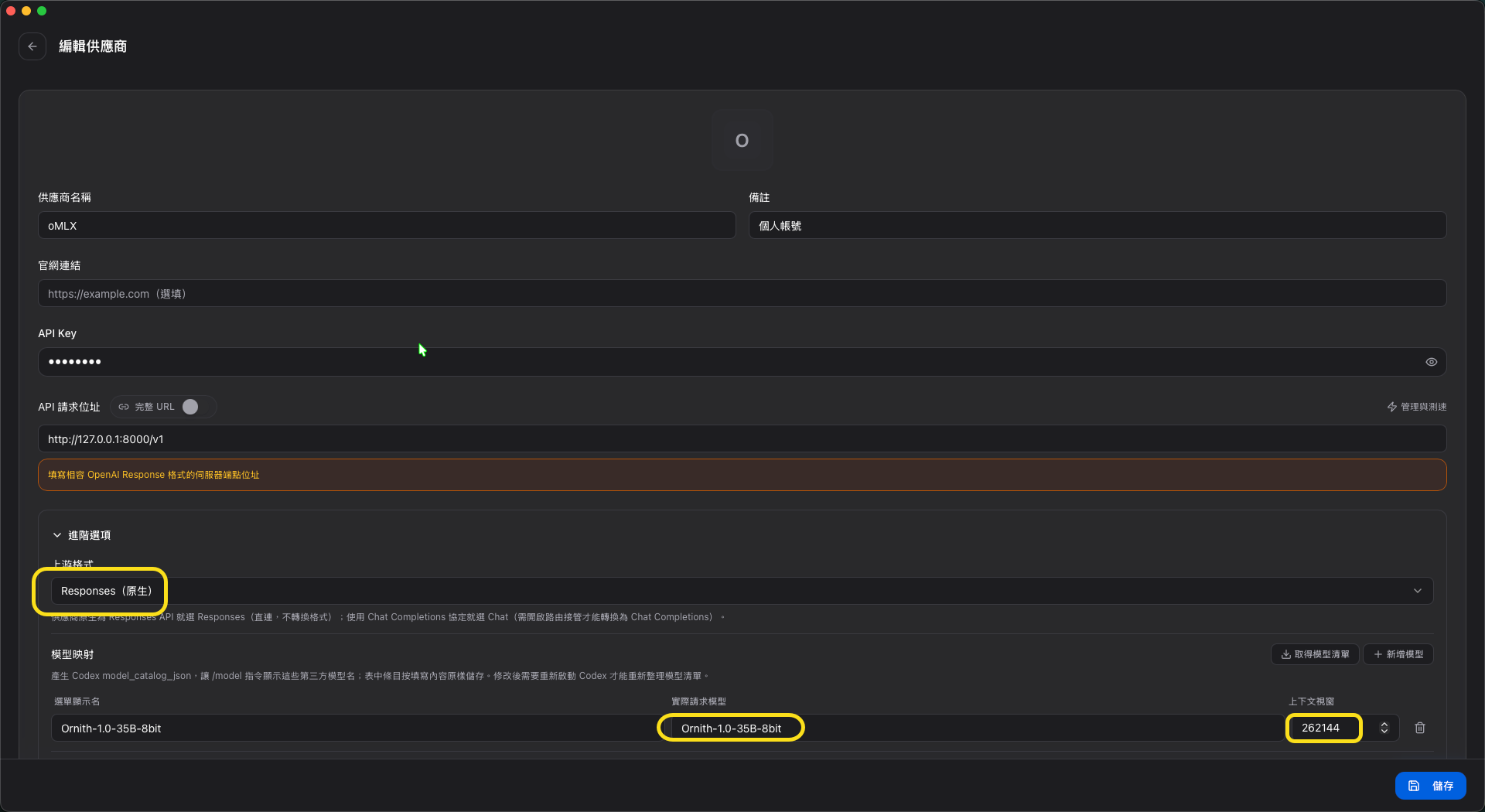
如果透過 CC Switch 管 Codex provider,oMLX provider 建議維持 Responses 原生格式:
auth.json 用 placeholder 表示:
CC Switch 的模型映射建議:
欄位 | 值 |
|---|---|
選單顯示名 |
|
實際請求模型 |
|
上下文視窗 |
|
上游格式 |
|
如果 Body override 只是為了測試,例如固定 { "temperature": 0.2 } ,正式使用時建議清空,讓 Codex 或 oMLX profile 管理 sampling。
CC Switch 遠端壓縮相容性問題
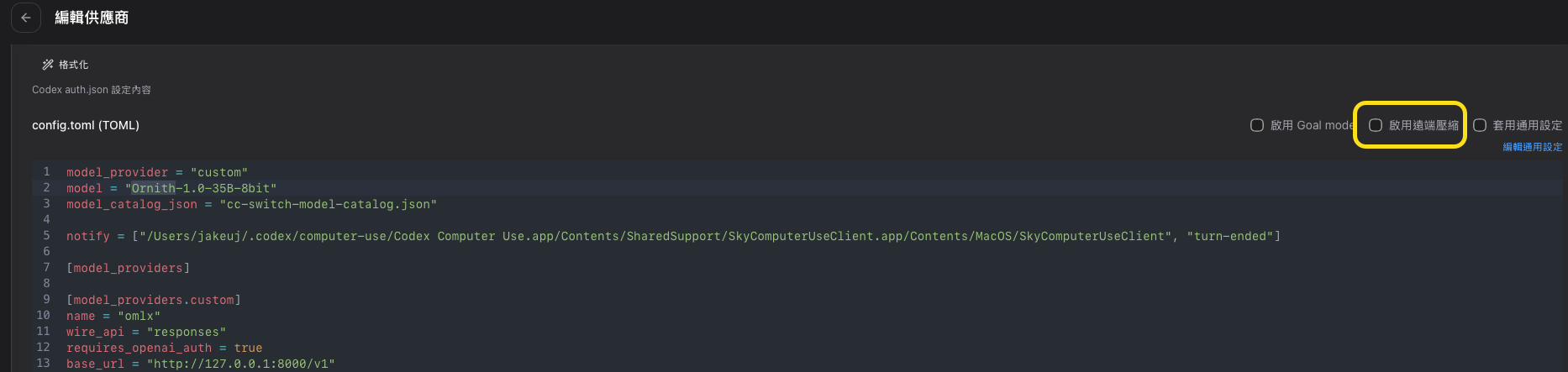
透過 CC Switch 使用 oMLX 時, 啟用遠端壓縮(Remote Compaction)會讓 Codex 呼叫 oMLX 出錯。
解法很簡單:在 CC Switch 的壓縮設定中,把「本地壓縮 / Remote Compaction / Local compression」關閉即可。
設定 | 建議值 |
|---|---|
本地壓縮 / Remote Compaction / Local compression | 關閉 |
這是已知相容性問題,與 oMLX 的 Responses API 實作有關。關閉遠端壓縮後,Codex 與 oMLX 之間的請求可以正常運作。
Direct Codex 設定方向
不透過 CC Switch 時,可以讓 Codex 直接連 oMLX:
啟動前設定環境變數:
如果使用桌面 App 或 provider manager 會覆蓋 ~/.codex/config.toml ,就以 UI 內儲存的 provider 設定為準,不要同時手改多份設定。
驗證方式
測 Responses 是否混入 thinking
判斷方式:
沒有輸出:
<think>沒混進 JSON 文字欄位。出現在
message.content或output_text:reasoning 分離有問題。出現在明確的 reasoning 欄位:通常可接受,但仍要看 client 是否支援。
抽出最終回答
正常時只應該看到:
最終建議
在 M4 Max 128 GB 的本機 coding agent 場景,這組設定可以先當 baseline:
層級 | 建議 |
|---|---|
oMLX API | Responses 原生 |
context window | 262144 |
output max tokens | 32768,可依任務縮小 |
thinking | 開啟二元 on/off |
thinking budget | 先關 |
reasoning parser |
|
Codex reasoning levels | 不宣告 |
Codex search tool | 不宣告,除非有 proxy 支援 |
CC Switch 遠端壓縮 | 關閉 |
active profile | coding 用 |
這樣設定的目標是讓模型保留 reasoning 能力,但不要讓 Codex 或 CC Switch 以為它支援 OpenAI-style reasoning effort level。外層 API 用 Responses,內層仍由 oMLX 套 chat template;兩者不衝突。