Azure API Management
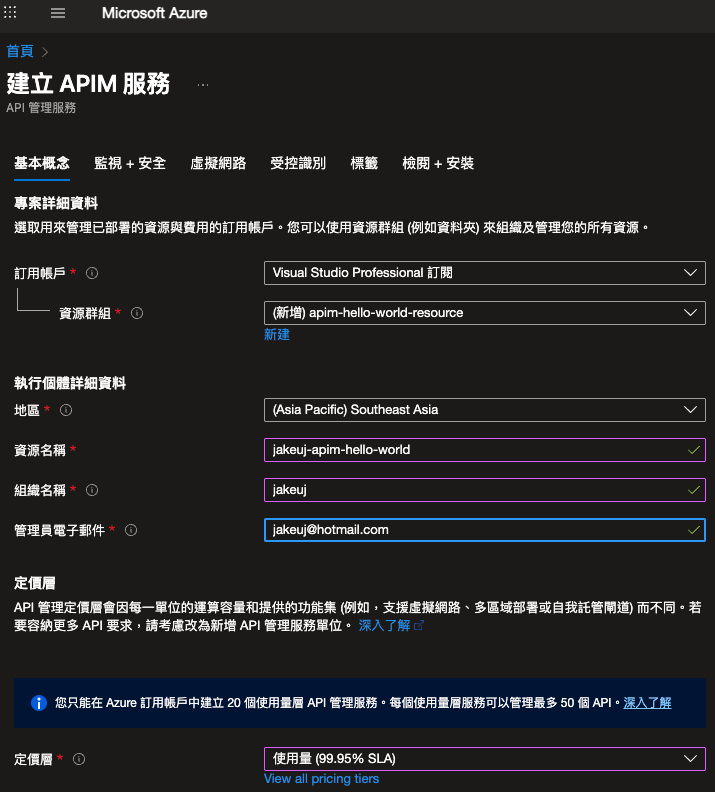
Create a new instance (MS Docs)
簡介
Azure API Management(APIM)是一個用來發佈、管理、保護與分析 API 的平台。它位於前端(API Gateway),負責路由請求、應用 policy(授權、流量控管、轉換)、以及收集使用量與診斷資料。
適用場景:企業內部 API 門面、第三方 API 開放、微服務聚合、跨團隊的 API 管理與版本控管。
主要概念與元件
Instance(Service): APIM 的實體資源。
API: 在 APIM 中的 API 定義,可以從 OpenAPI、WSDL、Function App、Logic App 或 URL 匯入。
Product: 將多個 API 組成產品,並控制是否對外公開與需不需要訂閱金鑰(subscription key)。
Subscription: 用戶要呼叫受保護 API 時,通常需要訂閱並取得 subscription key。
Policy: 在 API 入口處執行的 XML 規則串,常用於授權、配額、轉換與日誌。
Backend: 定義實際後端服務位置(可支援多種協定與認證)。
Revision / Version: API 的修訂與版本管理機制。
快速上手(常見步驟)
建立 APIM instance(Portal / CLI / ARM / Bicep)。
匯入或建立 API:可上傳 OpenAPI (swagger) 或直接從 App Service / Function 匯入。
建立 Product,設定是否需要 subscription key。
設定 policy(在 global / product / api / operation 層級皆可)。
測試並發佈(Developer portal 可用來測試與文件展示)。
小技巧:開發階段可用 Developer tier(較低成本且支援 dev 功能);生產請選 Standard 或 Premium(視網路區域與 VNet 要求)。
常用 Policy 範例
在 APIM 中 policy 使用 XML 定義,常見用法如下。把這些片段貼到 API 或 operation 的 policy 區塊。
限流(rate-limit-by-key)
設置/覆寫 Header
轉換路徑 (rewrite-uri)
驗證 JWT(validate-jwt)
注意:將 替換為你的 tenant 的 OpenID 設定 URL,例如 https://login.microsoftonline.com/{tenant}/.well-known/openid-configuration。
回傳自訂錯誤
CI/CD 與自動化部署
建議把 API、policy、Products 等資源以 ARM template、Bicep 或 API Management DevOps Resource Kit 的形式納入版本控制。
ARM / Bicep:可將 APIM instance 與 API definitions、policies 編排為基礎設施代碼。
API Management DevOps Resource Kit:官方套件,能將 APIM 設定匯出為 CI/CD friendly artifacts(尤其 policy 與 api 的分離)。
GitHub Actions 範例(概念):
注意事項:APIM 的 policy 檔案對大小寫與 XML 格式敏感,建議在 pipeline 中加入驗證步驟。
監控、日誌與診斷
Application Insights:可連到 APIM 收集呼叫端追蹤(Tracing)與自訂事件。
Azure Monitor / Log Analytics:收集診斷日誌(request, trace, event),便於查詢、建立警示和儀表板。
APIM 提供「診斷」功能,可在 policy 中插入 log-to-eventhub / log-to-application-insights。
範例(log to App Insights):
安全性最佳實務
使用 OAuth 2.0 / OpenID Connect 保護 API,並在 policy 中驗證 token(validate-jwt)。
最小權限原則:API 只授權必要的後端權限。
使用 Managed Identity 與 Key Vault 管理敏感憑證(後端證書、密鑰)。
若需保護內部後端,可使用 Client Certificate 或 IP 封鎖。
啟用 HTTPS 與 TLS 最低版本要求。
常見問題(FAQ)
Q: 如何在 APIM 中測試 API? A: 在 Azure Portal 的 APIM -> APIs -> 選擇 API -> Test,可直接呼叫並查看回應;也可使用 Developer portal。
Q: APIM 與 Application Gateway / API Gateway 差異? A: APIM 更偏向 API 管理(策略、開發者門戶、計費/訂閱),而 Application Gateway/NGINX 則偏向 L7 負載平衡與 WAF。視需求可兩者併用(例如 WAF 在前,APIM 在後)。
Q: Policy 應該放在哪個層級? A: 依影響範圍而定:global(影響所有 API)、product(影響該產品下的 API)、api(影響整個 API)、operation(影響單一 operation)。優先使用較小範圍以減少意外影響。
參考連結
官方文件:https://learn.microsoft.com/zh-tw/azure/api-management/
DevOps Resource Kit: https://github.com/Azure/azure-api-management-devops-resource-kit
APIM policy reference: https://learn.microsoft.com/zh-tw/azure/api-management/api-management-howto-policies
Getting started: https://learn.microsoft.com/zh-tw/azure/api-management/get-started-create-service-instance
最後更新:2025-12-17