ABP 新手教學 No.8 單元測試
ABP (ASP.NET Boilerplate) 應用程式開發框架 新手教學 No.8 單元測試
ABP (ASP.NET Boilerplate) 應用程式開發框架 新手教學 No.0 索引
ABP也提供了單元測試,位於方案Test資料夾內的MyCompany.MyProject.Tests測試專案
首先我們需要一個假的資料庫,這邊樣板專案其實已經幫我們建立好了
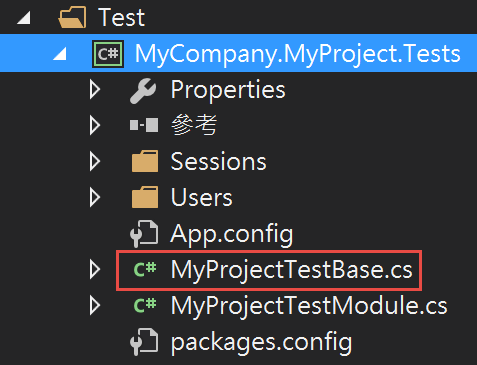
但我們還需要修改一下,在裡面加上我們先前做好的SeedData,這樣測試資料庫裡面才會有我們後來新增的預設資料
修改 Test\MyCompany.MyProject.Tests\MyProjectTestBase.cs
using System;
using System.Collections.Generic;
using System.Data.Common;
using System.Data.Entity;
using System.Linq;
using System.Threading.Tasks;
using Abp;
using Abp.Configuration.Startup;
using Abp.Domain.Uow;
using Abp.Runtime.Session;
using Abp.TestBase;
using MyCompany.MyProject.EntityFramework;
using MyCompany.MyProject.Migrations.SeedData;
using MyCompany.MyProject.MultiTenancy;
using MyCompany.MyProject.Users;
using Castle.MicroKernel.Registration;
using Effort;
using EntityFramework.DynamicFilters;
namespace MyCompany.MyProject.Tests
{
public abstract class MyProjectTestBase : AbpIntegratedTestBase<MyProjectTestModule>
{
private DbConnection _hostDb;
private Dictionary<int, DbConnection> _tenantDbs; //only used for db per tenant architecture
protected MyProjectTestBase()
{
//Seed initial data for host
AbpSession.TenantId = null;
UsingDbContext(context =>
{
new InitialHostDbBuilder(context).Create();
new DefaultTenantCreator(context).Create();
});
//Seed initial data for default tenant
AbpSession.TenantId = 1;
UsingDbContext(context =>
{
new TenantRoleAndUserBuilder(context, 1).Create();
});
//Seed initial data for default map
UsingDbContext(context =>
{
new PlayerAndMapBuilder(context).Create();
});
LoginAsDefaultTenantAdmin();
}
protected override void PreInitialize()
{
base.PreInitialize();
/* You can switch database architecture here: */
UseSingleDatabase();
//UseDatabasePerTenant();
}
/* Uses single database for host and all tenants.
*/
private void UseSingleDatabase()
{
_hostDb = DbConnectionFactory.CreateTransient();
LocalIocManager.IocContainer.Register(
Component.For<DbConnection>()
.UsingFactoryMethod(() => _hostDb)
.LifestyleSingleton()
);
}
/* Uses single database for host and Default tenant,
* but dedicated databases for all other tenants.
*/
private void UseDatabasePerTenant()
{
_hostDb = DbConnectionFactory.CreateTransient();
_tenantDbs = new Dictionary<int, DbConnection>();
LocalIocManager.IocContainer.Register(
Component.For<DbConnection>()
.UsingFactoryMethod((kernel) =>
{
lock (_tenantDbs)
{
var currentUow = kernel.Resolve<ICurrentUnitOfWorkProvider>().Current;
var abpSession = kernel.Resolve<IAbpSession>();
var tenantId = currentUow != null ? currentUow.GetTenantId() : abpSession.TenantId;
if (tenantId == null || tenantId == 1) //host and default tenant are stored in host db
{
return _hostDb;
}
if (!_tenantDbs.ContainsKey(tenantId.Value))
{
_tenantDbs[tenantId.Value] = DbConnectionFactory.CreateTransient();
}
return _tenantDbs[tenantId.Value];
}
}, true)
.LifestyleTransient()
);
}
#region UsingDbContext
protected IDisposable UsingTenantId(int? tenantId)
{
var previousTenantId = AbpSession.TenantId;
AbpSession.TenantId = tenantId;
return new DisposeAction(() => AbpSession.TenantId = previousTenantId);
}
protected void UsingDbContext(Action<MyProjectDbContext> action)
{
UsingDbContext(AbpSession.TenantId, action);
}
protected Task UsingDbContextAsync(Action<MyProjectDbContext> action)
{
return UsingDbContextAsync(AbpSession.TenantId, action);
}
protected T UsingDbContext<T>(Func<MyProjectDbContext, T> func)
{
return UsingDbContext(AbpSession.TenantId, func);
}
protected Task<T> UsingDbContextAsync<T>(Func<MyProjectDbContext, Task<T>> func)
{
return UsingDbContextAsync(AbpSession.TenantId, func);
}
protected void UsingDbContext(int? tenantId, Action<MyProjectDbContext> action)
{
using (UsingTenantId(tenantId))
{
using (var context = LocalIocManager.Resolve<MyProjectDbContext>())
{
context.DisableAllFilters();
action(context);
context.SaveChanges();
}
}
}
protected async Task UsingDbContextAsync(int? tenantId, Action<MyProjectDbContext> action)
{
using (UsingTenantId(tenantId))
{
using (var context = LocalIocManager.Resolve<MyProjectDbContext>())
{
context.DisableAllFilters();
action(context);
await context.SaveChangesAsync();
}
}
}
protected T UsingDbContext<T>(int? tenantId, Func<MyProjectDbContext, T> func)
{
T result;
using (UsingTenantId(tenantId))
{
using (var context = LocalIocManager.Resolve<MyProjectDbContext>())
{
context.DisableAllFilters();
result = func(context);
context.SaveChanges();
}
}
return result;
}
protected async Task<T> UsingDbContextAsync<T>(int? tenantId, Func<MyProjectDbContext, Task<T>> func)
{
T result;
using (UsingTenantId(tenantId))
{
using (var context = LocalIocManager.Resolve<MyProjectDbContext>())
{
context.DisableAllFilters();
result = await func(context);
await context.SaveChangesAsync();
}
}
return result;
}
#endregion
#region Login
protected void LoginAsHostAdmin()
{
LoginAsHost(User.AdminUserName);
}
protected void LoginAsDefaultTenantAdmin()
{
LoginAsTenant(Tenant.DefaultTenantName, User.AdminUserName);
}
protected void LoginAsHost(string userName)
{
Resolve<IMultiTenancyConfig>().IsEnabled = true;
AbpSession.TenantId = null;
var user =
UsingDbContext(
context =>
context.Users.FirstOrDefault(u => u.TenantId == AbpSession.TenantId && u.UserName == userName));
if (user == null)
{
throw new Exception("There is no user: " + userName + " for host.");
}
AbpSession.UserId = user.Id;
}
protected void LoginAsTenant(string tenancyName, string userName)
{
var tenant = UsingDbContext(context => context.Tenants.FirstOrDefault(t => t.TenancyName == tenancyName));
if (tenant == null)
{
throw new Exception("There is no tenant: " + tenancyName);
}
AbpSession.TenantId = tenant.Id;
var user =
UsingDbContext(
context =>
context.Users.FirstOrDefault(u => u.TenantId == AbpSession.TenantId && u.UserName == userName));
if (user == null)
{
throw new Exception("There is no user: " + userName + " for tenant: " + tenancyName);
}
AbpSession.UserId = user.Id;
}
#endregion
/// <summary>
/// Gets current user if <see cref="IAbpSession.UserId"/> is not null.
/// Throws exception if it's null.
/// </summary>
protected async Task<User> GetCurrentUserAsync()
{
var userId = AbpSession.GetUserId();
return await UsingDbContext(context => context.Users.SingleAsync(u => u.Id == userId));
}
/// <summary>
/// Gets current tenant if <see cref="IAbpSession.TenantId"/> is not null.
/// Throws exception if there is no current tenant.
/// </summary>
protected async Task<Tenant> GetCurrentTenantAsync()
{
var tenantId = AbpSession.GetTenantId();
return await UsingDbContext(context => context.Tenants.SingleAsync(t => t.Id == tenantId));
}
}
}
這邊其實只有在建構函式加上我們的 PlayerAndMapBuilder
UsingDbContext(context =>
{
new PlayerAndMapBuilder(context).Create();
});
這樣就會在建立測試用的記憶體資料庫中新增我們的SeedData
接著我們先建立Player資料夾,在裡面新增PlayerAppService_Tests.cs
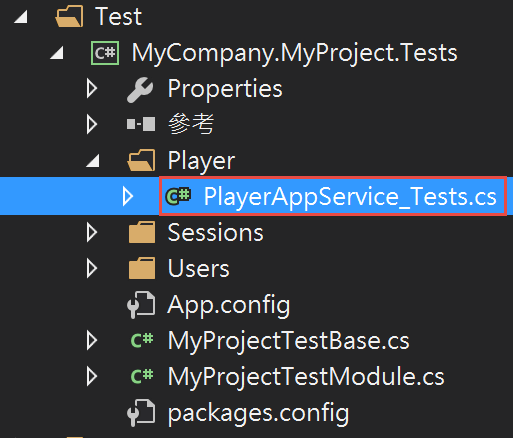 然後我們來開始在裡面寫測試方法
using MyCompany.MyProject.PlayerApp;
using MyCompany.MyProject.PlayerApp.Dto;
using Shouldly;
using System.Linq;
using Xunit;
namespace MyCompany.MyProject.Tests.Player
{
public class PlayerAppService_Tests : MyProjectTestBase
{
private readonly IPlayerAppService _playerAppService;
public PlayerAppService_Tests()
{
_playerAppService = Resolve<IPlayerAppService>();
}
[Fact]
public void CreatePlayer_Test()
{
//Act
_playerAppService.CreatePlayer(
new PlayerInput
{
PlayerName = "jakeuj00",
});
UsingDbContext(context =>
{
var jakeujPlayer = context.Players.FirstOrDefault(u => u.PlayerName == "jakeuj00");
//Assert
jakeujPlayer.ShouldNotBeNull();
});
}
}
}
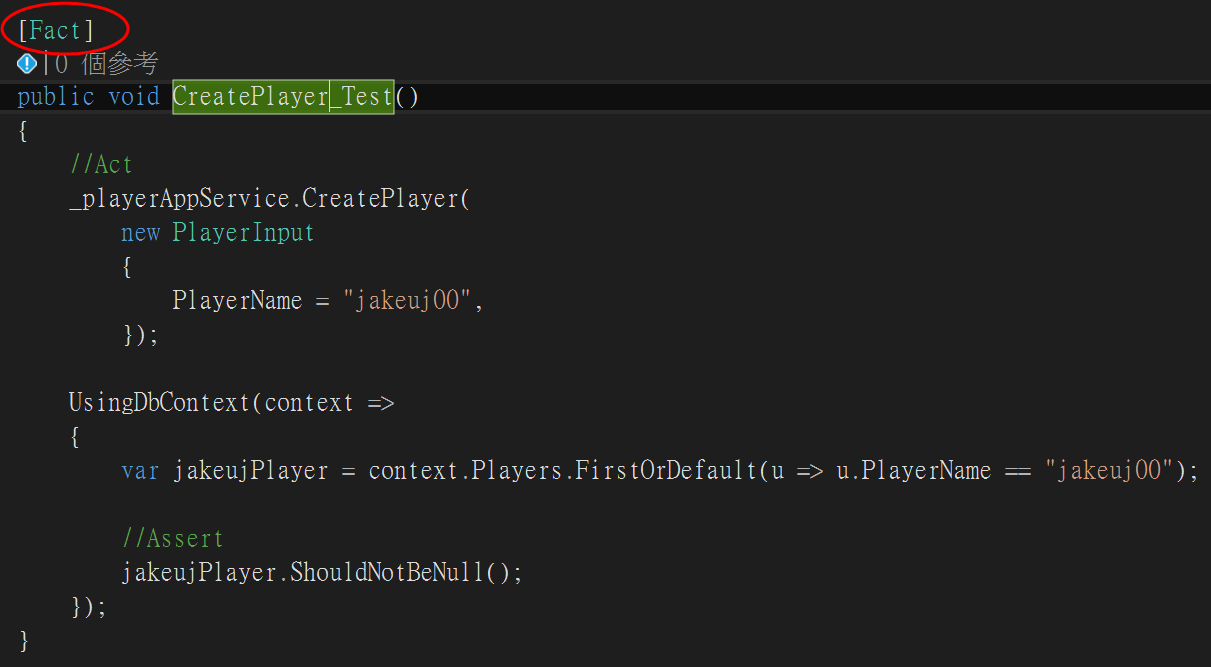
[Fact] 讓 xUnit 知道 void CreatePlayer_Test() 是一個測試方法
Act 新增了一筆資料到Player
Assert 檢查資料是否正確寫入資料庫
AAA (排列、作用、判斷提示) 模式是為受測方法撰寫單元測試的常見方式
Arrange: [排列] 區段會初始化物件,並為傳遞至受測方法的資料設定值。
Act: [作用] 區段會叫用含有所排列參數的受測方法
Assert: [判斷提示] 區段會驗證受測方法的動作是否如預期。
這樣我們的測試程式就準備好了,接著我們先編譯一下方案
然後會發現測試方法左上角有測試按鈕可以點進去執行測試
 測試成功會打勾
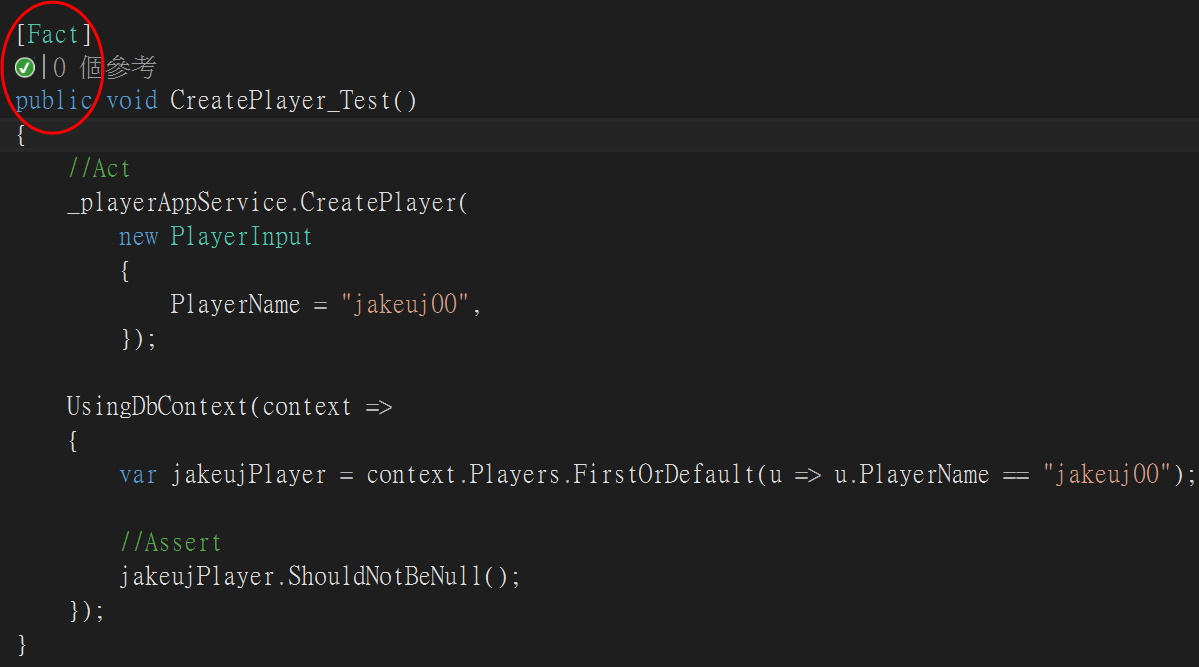 我們把輸入資料庫的資料改成01,測試是否會如期檢測出錯誤
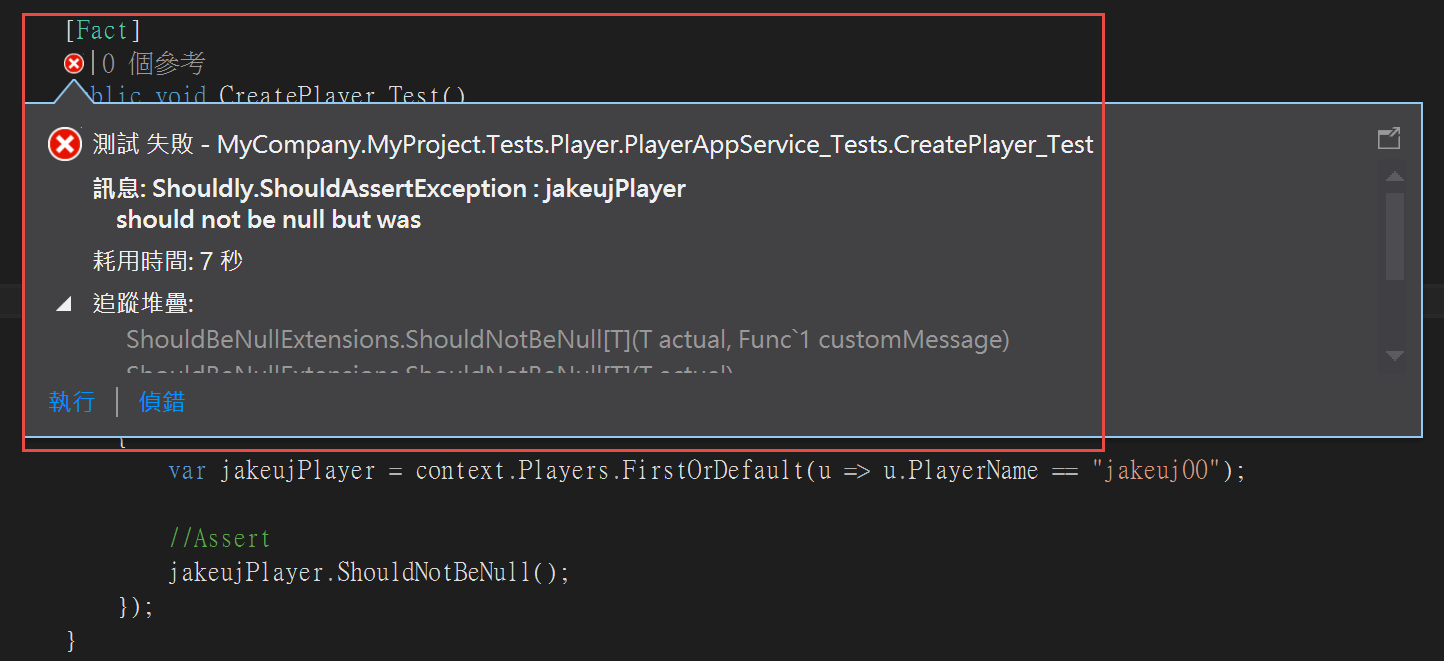
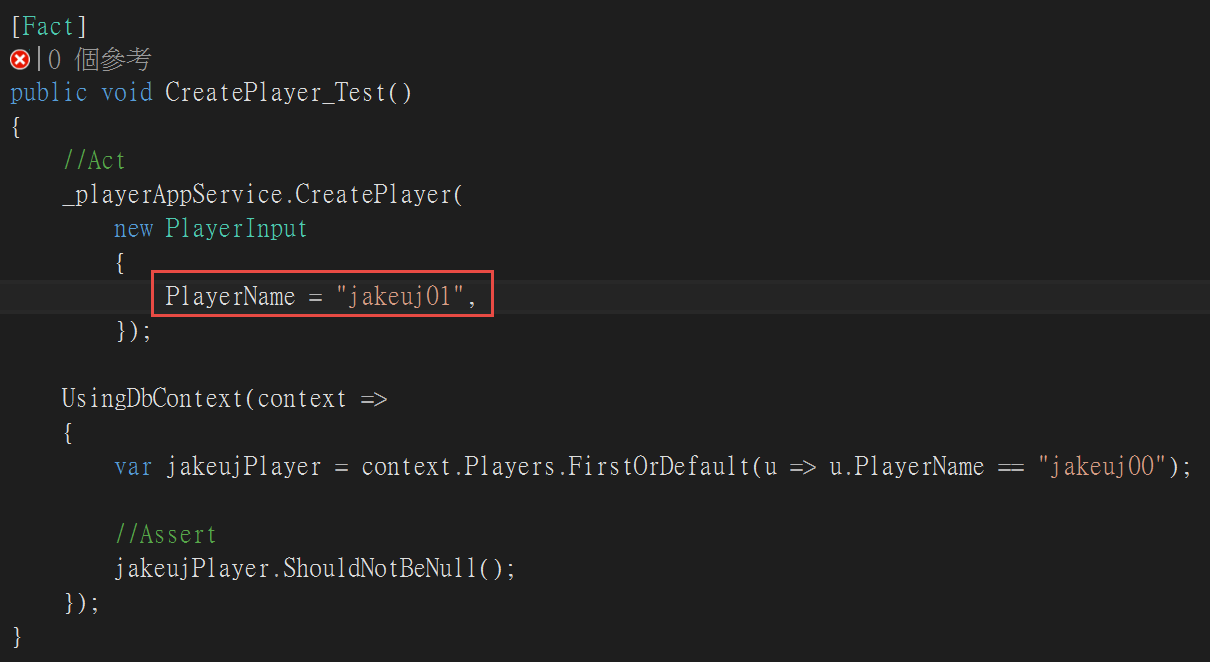 結果確實就過不了檢查
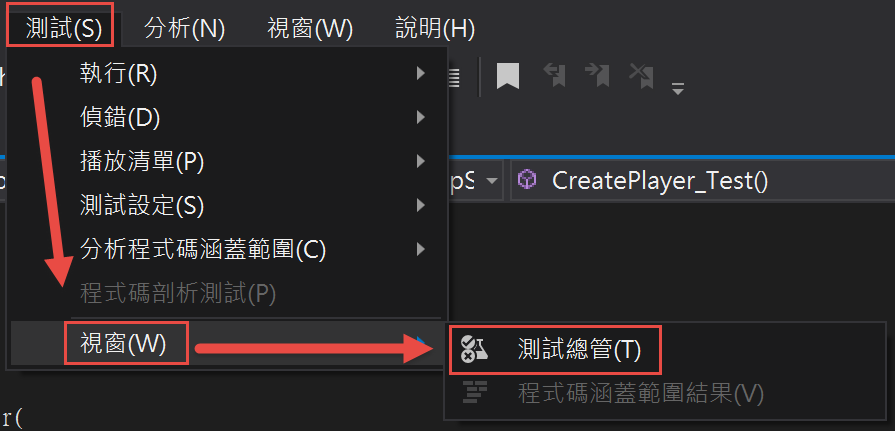
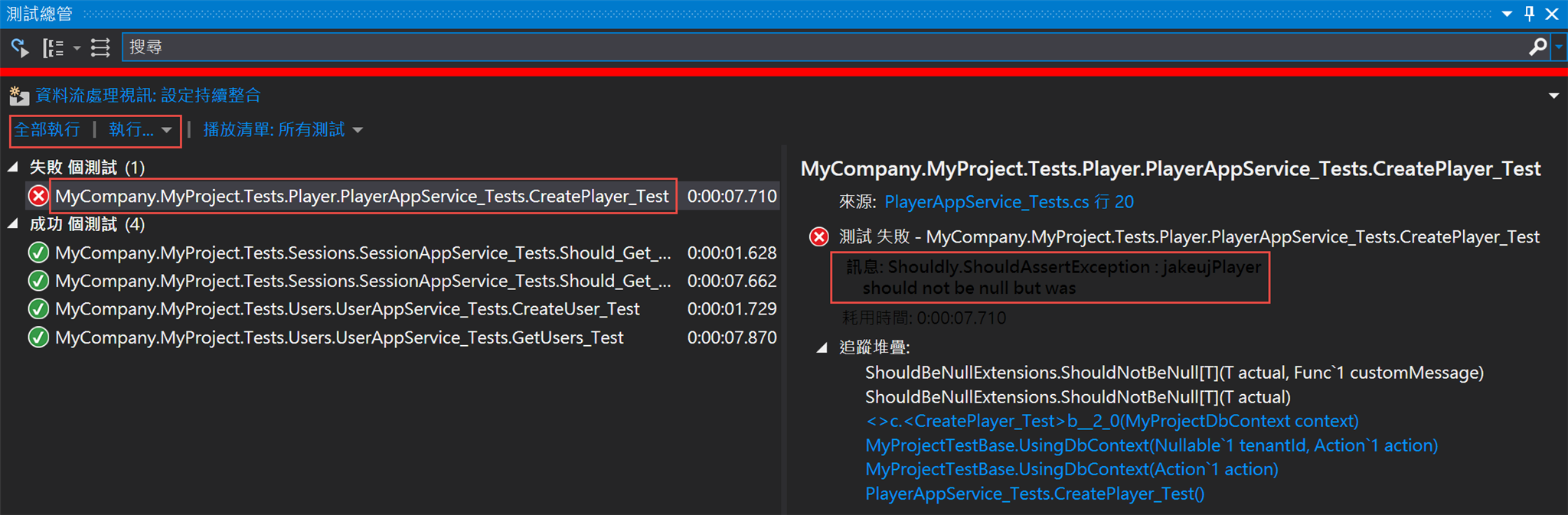
 或是你可以打開測試總管 (測試→視窗→測試總管)
來測試全局的方法
 到這邊測試單元到一個段落,全篇新手心得也先告一個段落
下一篇
ABP (ASP.NET Boilerplate) 應用程式開發框架 新手教學 No.9 全篇後記
參照
一步一步使用ABP框架搭建正式項目系列教程

PS5
本文章從點部落遷移至 Writerside
10 June 2026