Jakeuj's Notes master Help

ABP 新手教學 No.6 建立應用服務

ABP (ASP.NET Boilerplate) 應用程式開發框架 新手教學 No.6 建立應用服務

ABP (ASP.NET Boilerplate) 應用程式開發框架 新手教學 No.0 索引

應用服務主要是表現層與領域層中間溝通的橋樑,提供了服務給表現層調用,讓表現層與領域層的耦合降低

另外在這層也提供了資料傳輸物件(DTO),來與表現層互相傳遞資料,主要是Input與Output部分

首先我們一樣案架構來到應用服務層MyCompany.MyProject.Application專案

建立PlayerApp資料夾(命名規則:xxxxxApp)來放我們的服務 (介面 IPlayerAppService、類別 PlayerAppService)

1469676937 25115 其中建立DTO資料夾來放基本DTO與輸入/輸出DTO (PlayerDto、PlayerInput、PlayerOptput)

MyCompany.MyProject.Application\PlayerApp\Dto\PlayerDto.cs

using Abp.Application.Services.Dto; namespace MyCompany.MyProject.PlayerApp.Dto { public class PlayerDto : EntityDto<long> { public long PlayerID { get; set; } public string PlayerName { get; set; } public long MapID { get; set; } } }

PlayerInput.cs

using Abp.Application.Services.Dto; using Abp.Runtime.Validation; using System.ComponentModel.DataAnnotations; namespace MyCompany.MyProject.PlayerApp.Dto { public class PlayerInput : IInputDto { public long PlayerID { get; set; } public string PlayerName { get; set; } public long MapID { get; set; } } public class GetPlayerInput : IInputDto { public string PlayerName { get; set; } public long MapID { get; set; } } public class CreatePlayerInput : IInputDto, IShouldNormalize { [Required] public string PlayerName { get; set; } public long MapID { get; set; } public void Normalize() { if (MapID == 0) { MapID = 1; } } } }

這裡可以利用 System.ComponentModel.DataAnnotations 來用 [Required] 標記

而因為我們繼承了IInputDto,該介面又繼承了IValidate,所以ABP會自動替我們做驗證

標準化:IShouldNormalize定義了必須實作標準化方法Normalize()

在驗證完成後會自動跑裡面的設定,處理屬性為空時給定預設值之類的BaLaBaLaBaLa

PlayerOptput.cs

using Abp.Application.Services.Dto; using System.Collections.Generic; namespace MyCompany.MyProject.PlayerApp.Dto { public class PlayerOutput : IOutputDto { public long MapID { get; set; } public string PlayerName { get; set; } } public class GetPlayersOutput : IOutputDto { public List<PlayerDto> Players { get; set; } } }
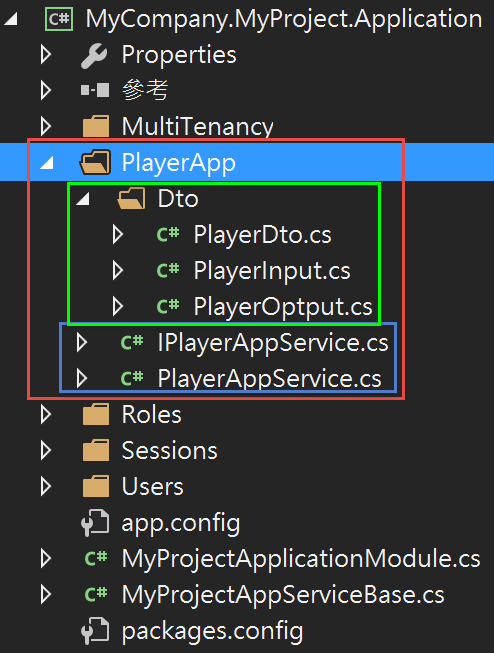
到這邊DTO基本就建立完成,再來是Service部分

首先是 服務(Service) 介面定義,命名規則使用 I+實體名稱(單數)+AppService

建立介面 IPlayerAppService.cs

MyCompany.MyProject.Application\PlayerApp\IPlayerAppService.cs

using Abp.Application.Services; using MyCompany.MyProject.PlayerApp.Dto; namespace MyCompany.MyProject.PlayerApp { public interface IPlayerAppService : IApplicationService { GetPlayersOutput GetPlayers(GetPlayerInput input); void UpdatePlayer(PlayerInput input); void CreatePlayer(PlayerInput input); } }

實作介面

PlayerAppService.cs

using Abp.UI; using AutoMapper; using MyCompany.MyProject.Entities; using MyCompany.MyProject.IRepositories; using MyCompany.MyProject.PlayerApp.Dto; using System.Collections.Generic; namespace MyCompany.MyProject.PlayerApp { public class PlayerAppService : MyProjectAppServiceBase, IPlayerAppService { private readonly IPlayerRepository _playerRepository; public PlayerAppService(IPlayerRepository playerRepository) { _playerRepository = playerRepository; } public void CreatePlayer(PlayerInput input) { var playerEntity = _playerRepository.FirstOrDefault(player => player.PlayerName.Equals(input.PlayerName)); if (playerEntity != null) throw new UserFriendlyException("該玩家數據已經存在!"); else { playerEntity = new Player() { PlayerName = input.PlayerName, MapID = 1 }; _playerRepository.Insert(playerEntity); } } public GetPlayersOutput GetPlayers(GetPlayerInput input) { if (!string.IsNullOrEmpty(input.PlayerName)) { //Get entities var playerEntityList = _playerRepository.GetAllList(player => player.PlayerName.Contains(input.PlayerName)); //Convert to DTOs return new GetPlayersOutput { Players = Mapper.Map<List<PlayerDto>>(playerEntityList) }; } if (input.MapID > 0) { //Get entities var playerEntityList = _playerRepository.GetPlayersWithMap(input.MapID); //Convert to DTOs // 用AutoMapper自動將List<Task>轉換成List<TaskDto> return new GetPlayersOutput { Players = Mapper.Map<List<PlayerDto>>(playerEntityList) }; } throw new UserFriendlyException("參數有誤!"); } public void UpdatePlayer(PlayerInput input) { Logger.Info(" Updating a Player for input: " + input); var playerEntity = _playerRepository.Get(input.PlayerID); if (playerEntity == null) throw new UserFriendlyException("該玩家數據不存在!"); if (!string.IsNullOrEmpty(input.PlayerName)) { playerEntity.PlayerName = input.PlayerName; } if (input.MapID > 0) { playerEntity.MapID = input.MapID; } } } }

到這邊就完成了應用服務層

下一篇

ABP (ASP.NET Boilerplate) 應用程式開發框架 新手教學 No.7 建立WebApi

參照

一步一步使用ABP框架搭建正式項目系列教程

Jakeuj

PS5

  • C#

  • 回首頁

本文章從點部落遷移至 Writerside

14 October 2025